Features A to Z. Every term explained.
Every capability from our word cloud, fully explained — what it is, how it works in Maritime ERP, and what it looks like in the daily business of a maritime service company.
Orders
Vessels
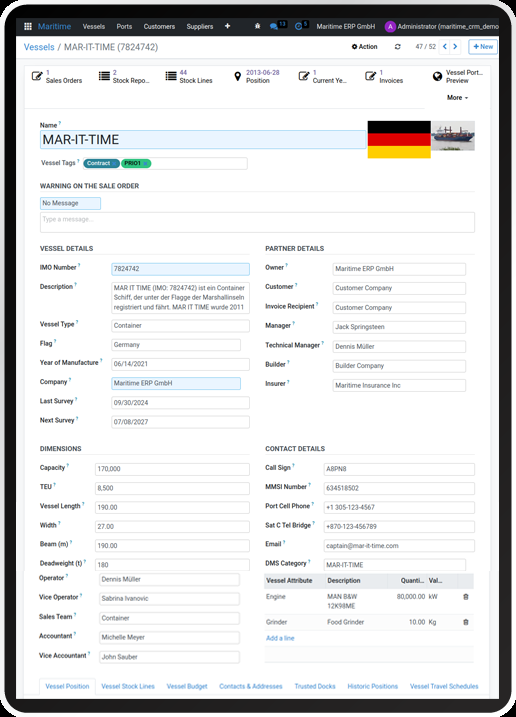
A vessel record is the digital twin of a ship: IMO number, name, flag, type, dimensions, tonnage, owner, technical manager, insurer and every contact you need to reach on board or ashore. In Maritime ERP the vessel is the anchor of the whole data model — everything else connects to it.
Open a vessel and you see its complete relationship with your company on one screen: every quotation, order and invoice ever written for it, its documents and certificates, its positions and travel schedule, its stock and budgets. Smart buttons take you from the vessel to any related record in one click — and back. New vessels are created in seconds, imported from Excel, or picked from the map.
A tug operator gets a call about the container vessel MACKENZIE. The dispatcher types three letters, opens the vessel, and sees that the same ship was assisted twice last year, which pricelist applied, and who the technical manager is — before the caller has finished the first sentence.
Sales Orders
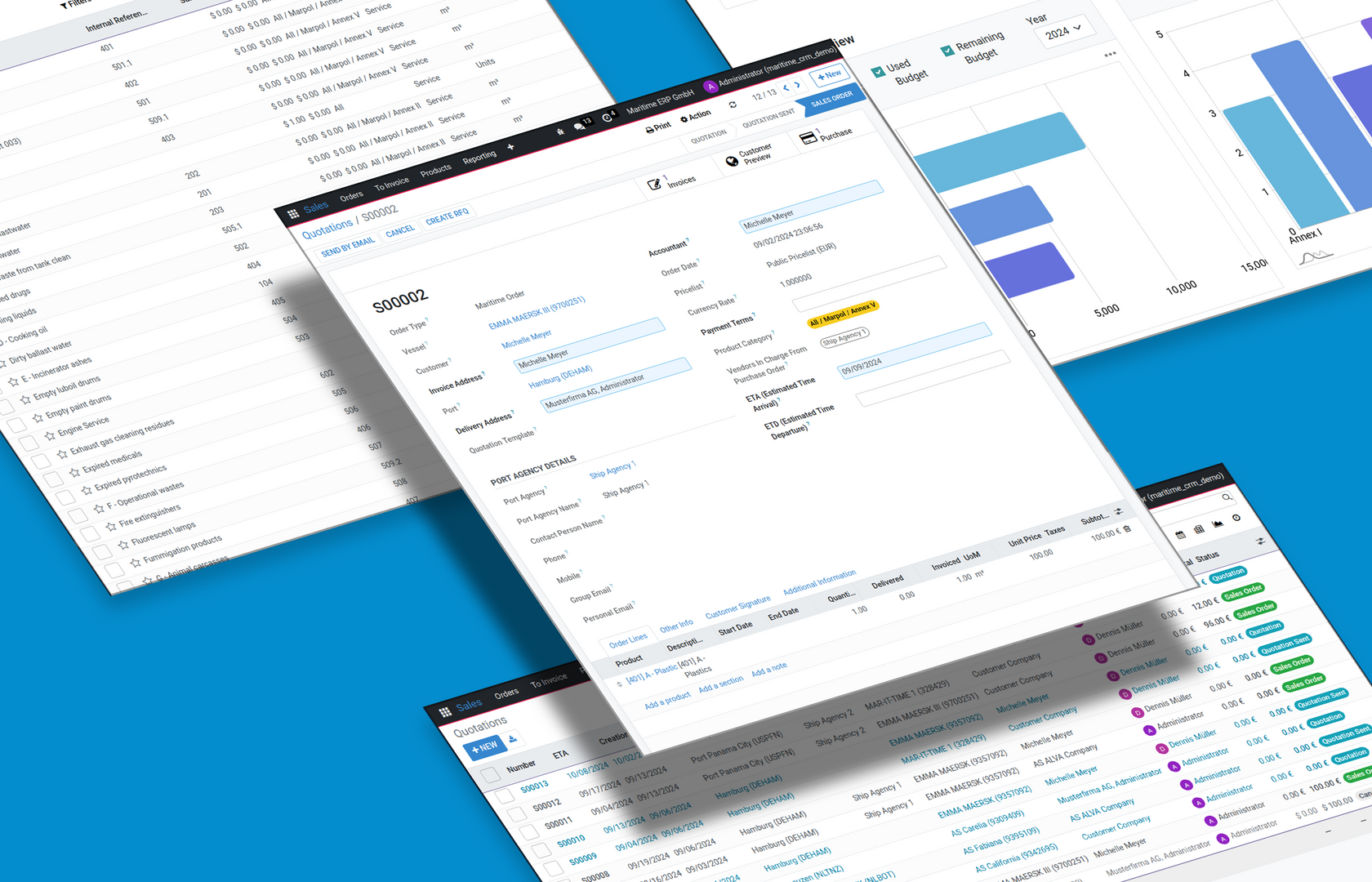
The sales order is the central business document: which service, for which vessel, in which port, at what price. In generic systems assembling this takes many steps — in Maritime ERP it is one click from the vessel, because customer, invoice recipient, pricelist and terms are already stored on the ship.
Each order carries maritime context that generic ERPs simply lack: the vessel with IMO number, the port of service, port agency details, ETA and ETD. Order lines price themselves from port tariffs and customer pricelists. From the confirmed order you generate the delivery, the certificate where applicable, and the invoice — every step stays linked, so the paper trail assembles itself.
A pilot boards at 06:40. By 06:42 the dispatcher has created the sales order: vessel opened, service picked, Hamburg tariff applied automatically. The confirmation is in the agent's inbox before the ship reaches the lock.
Port Tariffs
Maritime services are priced by port: the same job costs differently in Hamburg, Bremerhaven or Rotterdam. Port tariffs store this matrix — service, port, price, validity period — as structured data instead of a spreadsheet someone keeps on their desktop.
When an order line is created, Maritime ERP looks up the tariff for the combination of service and port and prices the line automatically. Quotes become consistent across the whole team: every dispatcher offers the same correct price, updates apply from a single place, and old orders keep the tariff that was valid at their date.
The port raises its fees in January. You update the Hamburg tariff once — every quote from that day on calculates with the new rates, while December's invoices still show the old ones.
CRM
The CRM is the memory of your customer relationships: companies, contacts, communication history, open opportunities. Every shipowner, manager and agency you work with has one file that everyone in the team shares.
Incoming inquiries become leads, leads move through a pipeline you define — from first contact through quotation to won order — and each stage shows what to do next. E-mails attach themselves to the right record, activities remind the responsible colleague, and recurring service intervals resurface automatically so existing customers generate repeat business instead of going quiet.
A ship manager asked for a quote in March and went silent. In May the pipeline reminder pops up, the account manager calls, and the deal closes — because the system kept the thread alive.
Quotations
A quotation is the offer stage of the sales order: same document, earlier state. It is built from vessel data and customer pricelists, so producing a correct, complete offer takes seconds rather than a lunch break.
Quotes are sent by e-mail straight from the system with your letterhead, tracked, and followed up automatically when they stay unanswered. When the customer accepts, one click turns the quotation into a confirmed order — nothing is retyped, nothing gets lost between inbox and ERP.
An agent requests prices for three services on an inbound bulker. The quote — correct tariffs, correct currency, company letterhead — leaves the office four minutes later, while the competitor is still opening their Word template.
Leads
A lead is a potential deal before it has substance: a website inquiry, a call, a business card from a port reception. Maritime ERP captures each one with source, contact and — where known — vessel, port and requested service.
Leads from your website arrive automatically, complete with the vessel the visitor selected on the map. The team qualifies them, converts serious ones into opportunities with a customer file, and the pipeline makes sure every lead gets an answer.
A visitor clicks a vessel on your website's globe and requests a demo for it. The lead lands in the pipeline with ship and contact attached — ready to call back within the hour.
Ports
Ports are first-class records: each with its UN/LOCODE, its tariffs, the agencies that operate there, and your contacts on site. Orders reference the port they happen in, which makes 'revenue per port' a report instead of a research project.
Because ports and tariffs are linked, choosing a port on an order does real work: it selects the price basis, the local details and the right paperwork defaults.
Management asks which port generated the most towage revenue last quarter. The answer is one grouped report: Hamburg, then Bremerhaven, then Rotterdam — with order counts to back it up.
IMO Registry
The IMO number is the unchanging identity of a ship — names change, owners change, the IMO number stays. Maritime ERP uses it as the unique key of every vessel record.
That makes matching reliable everywhere: an incoming order confirmation, an AIS position or an old document all find the right ship via the IMO number, even when the vessel has been renamed twice since.
The SEVILLIA is sold and renamed. Her IMO number stays 9362712 — and with it, her entire service history in your system remains one unbroken record.
Pipelines
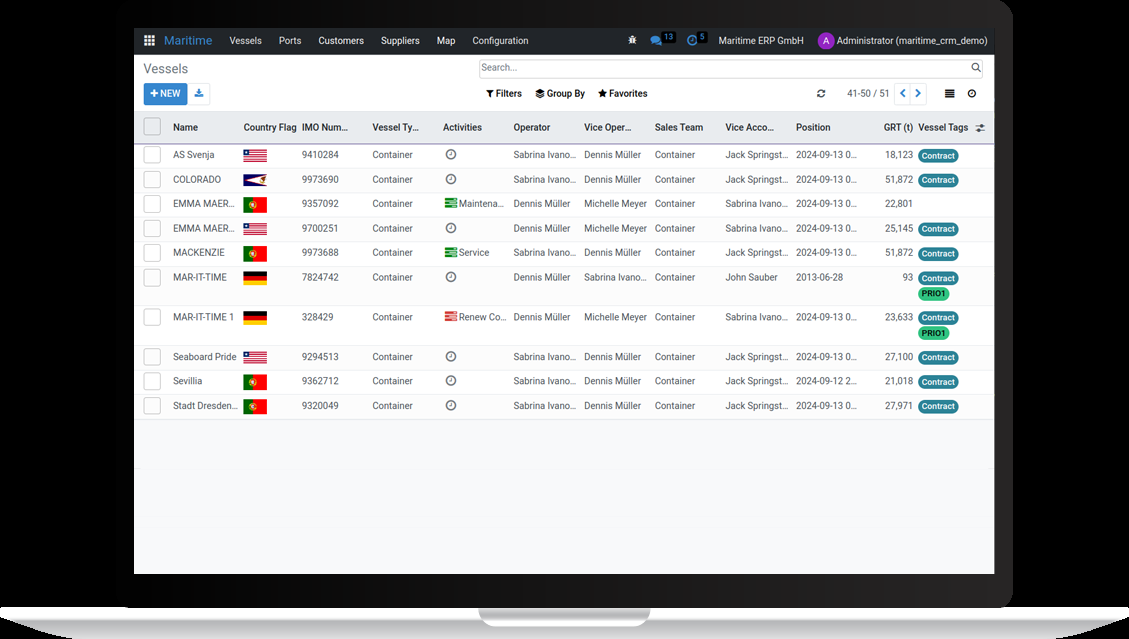
A pipeline is your sales process made visible: columns for each stage, cards for each opportunity, drag and drop to move deals forward. You define the stages to match how your business actually sells.
The board shows at a glance where revenue is waiting, which offers are stuck and who owns the next step. Managers get forecasts; account managers get focus.
Monday morning, the team looks at one screen: four quotes waiting for follow-up, two deals in negotiation, one closing this week. Everyone knows their moves before the first coffee is finished.
Follow-ups
Deals are rarely lost to competitors — they are lost to silence. Follow-ups are scheduled activities the system creates and tracks: call back on Thursday, resend the quote in a week, check in after the port call.
Recurring service intervals work the same way: when a vessel is due for its next inspection or service, the system raises the flag and a routine order proposes itself.
A quotation sits unanswered for five days. The system reminds the account manager, one friendly call follows — and the order is signed the same afternoon.
ETA/ETD
Estimated Time of Arrival and Estimated Time of Departure are the heartbeat of port business: your service window opens when the ship arrives and closes when she leaves.
Both timestamps live on the order, visible to dispatch and, through the portal, to your customer. Plans change at sea — updating the ETA once updates it for everyone.
The inbound vessel postpones her arrival by six hours. Dispatch updates the ETA, the crew assignment shifts automatically into the evening, and the customer sees the new window in the portal.
Travel Schedules
A travel schedule is a vessel's rotation: which ports, in which order, on which dates. Maritime ERP stores it per vessel, giving you the forward view of where your floating customers will be.
For service companies this is a sales calendar in disguise: every scheduled call in your port is an opportunity to offer your services in advance.
The schedule shows the STADT DRESDEN calling Hamburg every third Tuesday. Your team quotes a standing supply service for exactly those dates — recurring revenue from one glance at the rotation.
Calendar
The calendar view brings orders, port calls and team availability into one picture. Every entry is a live record — open it and you are on the order, not on a copy.
Dispatchers plan the day, the week or a single berth; teams see their assignments; changes propagate instantly because there is only one source of truth.
Two jobs collide on Thursday morning. The dispatcher sees it in the week view, drags one to the afternoon, and both crews get the updated plan on their phones.
Finance
Invoicing
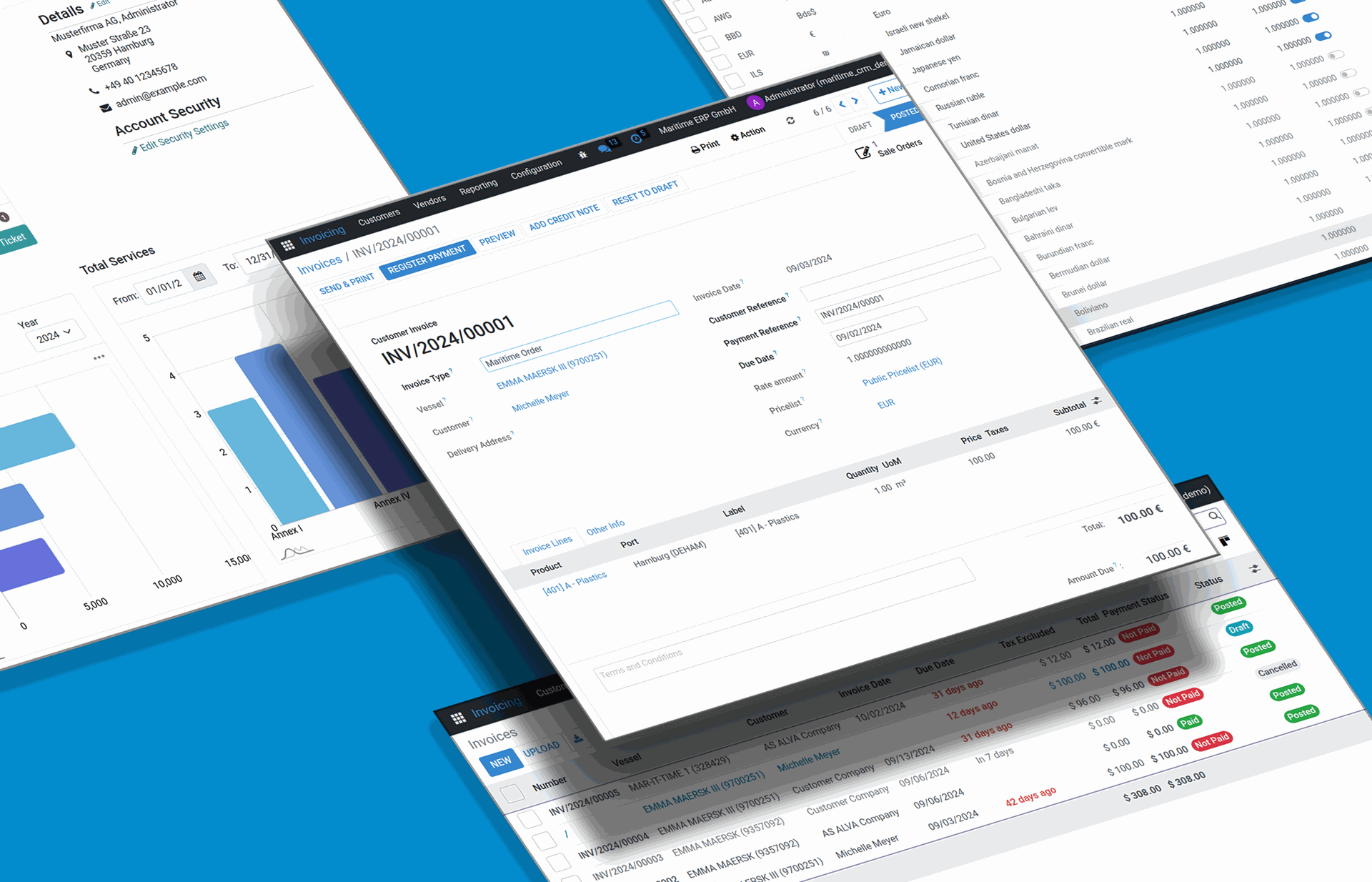
Invoicing turns confirmed work into money. In Maritime ERP invoices are generated from orders — per job, per vessel or collected per customer — so every position traces back to what was actually done, for which ship, in which port.
Send as branded PDF or as structured e-invoice (XRechnung, ZUGFeRD), in the customer's currency and language. Payment status updates live from the bank feed, and the reminder process handles overdue invoices with configurable, friendly escalation.
Month end at a pilotage company: 84 jobs become 12 collective invoices in one batch run. By the time the coffee machine finishes, the invoices are in the customers' inboxes and the open-items list is up to date.
Accounting
Full double-entry accounting is built into the same system that runs your operations — journals, chart of accounts, taxes, receivables and payables. Data flows from order to invoice to posting with zero re-entry.
The maritime twist: every posting can carry its vessel as an analytic dimension. Profitability per ship, per customer or per port is a standard report, and your month-end close starts from books that were kept current all along.
The managing director wants to know whether the Rotterdam business is worth the driving. The vessel- and port-level profit and loss answers in one view: yes — with 22% margin, slightly ahead of Hamburg.
Multi-Currency
Shipping is a dollar business, your accounting is a euro business, and your customer may prefer francs. Multi-currency support means every document — quote, order, invoice — carries its own currency while the books stay consistent in yours.
Exchange rates update automatically on schedule, conversions happen at document date, and realized gains or losses post correctly when payments arrive. Your team quotes in whatever currency wins the deal.
A Greek manager wants the offer in US dollars. The quote goes out in USD, the invoice too, the payment arrives in USD — and the ledger shows clean EUR postings with the rate difference booked automatically.
DATEV Export
DATEV is the standard language between German companies and their tax advisors. The DATEV export packages your bookings, receipts and master data in exactly the format the Kanzlei's software imports.
Instead of shipping folders of paper or half-compatible spreadsheets, you click once at month end. Fewer queries from the tax office, faster closings, and a tax advisor who spends billable hours on advice instead of typing.
On the 3rd of each month the accountant clicks 'DATEV export' and mails one file. The tax advisor's assistant imports it before lunch — the monthly close that used to take a week of back-and-forth is a formality.
XRechnung
XRechnung is Germany's structured e-invoice standard, mandatory when billing public-sector customers — port authorities, municipalities, government agencies among them.
Maritime ERP generates valid XRechnung documents natively from the same order data as your PDFs. Address a Leitweg-ID, send, done — you are compliant without a converter tool bolted on.
The port authority commissions a survey job and requires XRechnung with their Leitweg-ID. The invoice run produces it like any other invoice — same click, compliant format.
ZUGFeRD
ZUGFeRD is the hybrid e-invoice: a normal PDF for humans with machine-readable XML embedded inside. One file serves both the accounts-payable software and the person who still wants to read the invoice.
Since e-invoicing became mandatory between German businesses, ZUGFeRD is the pragmatic default: your customers' systems ingest it automatically, and nobody has to change how they read invoices.
Your customer's accounting software picks the XML out of the invoice PDF and books it untouched. Their accountant approves on screen; payment arrives two days earlier than it used to.
Bank Reconciliation
Bank reconciliation matches what happened on your account with what the books expect. Transactions import continuously through the bank connection, and the system proposes the matching invoice for each payment.
Most matches confirm themselves by amount and reference; the rest queue up for a quick human decision. The open-items list is current every morning, without anyone typing bank statements.
Overnight, 17 payments arrived. At 08:05 the accountant confirms 15 automatic matches, assigns 2 by hand, and the receivables list is exact — the whole exercise took four minutes.
Payment Reminders
Chasing money is uncomfortable, so it gets postponed — and liquidity suffers. Automated payment reminders take the task away: when an invoice passes its due date, a friendly reminder goes out; if needed, further stages follow at set intervals.
Every text is yours to define, from gentle nudge to formal notice, and every reminder is logged on the customer file. You stay polite, consistent and paid.
Day 8 after due date, the system mails a courteous reminder with the invoice attached. Day 9, the payment arrives — no phone call, no awkwardness, no forgotten case.
Collective Invoices
High-frequency service businesses produce dozens of small jobs per customer per month. Collective invoicing gathers them into one document — grouped, subtotaled, easy to approve on the receiving side.
You choose the rhythm (weekly, monthly, per port call) and the grouping (per vessel, per service type). Fewer documents, fewer bookings, faster approval at your customer's desk.
A shipping line receives one monthly invoice listing all 23 pilotage jobs, grouped by vessel. Their AP department approves one document instead of 23 — and pays on time.
Cost Centers
Cost centers split your business into units you want to measure: vessels, departments, branches, projects. Every posting can carry one, and reports pivot on them.
In a maritime service company the natural cost centers are ships and ports — Maritime ERP fills them automatically from the order context, so analytic accounting happens as a by-product of daily work.
The two crew boats each carry their own cost center. Fuel, maintenance and crew hours post against them automatically — and the annual review shows which boat earns her keep.
Budgets
Budgets put a plan next to reality: expected revenue or cost per vessel, customer or period, tracked against actuals as bookings come in.
Deviation is visible the day it happens, in dashboards and in the portal where you choose to share it — so course corrections happen mid-quarter.
The maintenance budget of a managed vessel reaches 80% in July. The alert prompts a conversation with the owner in August — instead of a surprise in December.
Pricelists
Pricelists hold what you agreed with each customer: their rates, their discounts, their currencies, their validity windows. Negotiated once, they apply automatically on every quote and order for that customer.
Combined with port tariffs, they form the pricing engine: the tariff says what the service costs in that port, the pricelist says what this customer pays for it.
A key account has 8% off towage and fixed rates for line handling. Every dispatcher's quote respects the agreement automatically — the key account manager sleeps well.
Reporting
Reporting answers the questions your business runs on: what did we earn, where, for whom, at what cost. Every report drills from the number to the record behind it.
Revenue and margin per vessel, customer and port come standard. Reports export to spreadsheet formats your accountant and your bank actually accept, and the numbers are current because they come from the live system.
The bank asks for a revenue breakdown for the credit line renewal. Finance exports the per-customer report for the last 24 months — ten minutes, done, and every figure reconciles with the books.
Dashboards
Dashboards are your live cockpit: open offers, this month's revenue, jobs per port, overdue invoices — each as a tile that updates itself and drills down on click.
Everyone gets the view their role needs: dispatch sees today's jobs, sales sees the pipeline, management sees the money.
On the office wall screen: 6 jobs today, 2 quotes overdue for follow-up, monthly revenue at 104% of plan. The morning meeting takes five minutes because the numbers are already on the wall.
Operations
Documents (DMS)
The document management system files every document where it belongs: on the vessel, the order, the customer. Versioning keeps history, full-text search finds anything, and access rules decide who sees what.
Because documents live on records instead of in folder trees, they surface exactly when needed — open the order and its delivery note, certificate and correspondence are right there. Portal sharing gives customers self-service access to their documents.
A customer calls about a job from last November. While they talk, the dispatcher opens the order and has the signed work confirmation on screen — retrieved by context, found in seconds.
Certificates
Ships live on valid paperwork: class certificates, safety certificates, survey reports. Maritime ERP stores them per vessel with their expiry dates and warns ahead of time.
For service companies whose work produces certificates, the system generates and files them on the order — downloadable by the customer through the portal.
Sixty days before a managed vessel's safety certificate expires, the responsible colleague gets the reminder — the renewal survey is booked before it becomes urgent.
Time Tracking
Hours are the raw material of a service business. Time tracking captures them per job and per employee — on the desktop or on the phone, right where the work happens.
Billable hours flow into invoicing with the correct rates; internal hours inform costing. Timesheets assemble themselves, and payroll gets clean numbers.
A fitter logs 3.5 hours on the generator job from the pier, phone in hand. The hours appear on the order, priced at the agreed rate, and next week they are a line on the collective invoice.
Helpdesk
The helpdesk turns customer requests into tickets with an owner, a priority and a deadline. Mails to your support address and portal submissions arrive in one queue.
Every ticket links to customer, vessel and order — context is one click away. Response times become measurable, so service quality is a number instead of a feeling.
A ship manager reports a wrong quantity via the portal at 9:15. The ticket lands with the responsible dispatcher, links to the order, and the corrected confirmation goes out at 9:40.
Purchasing
Purchasing manages what you buy to deliver your services: materials, subcontracted work, spares. Purchase orders link to the jobs and vessels they serve.
Supplier files hold certificates and price agreements; incoming invoices reconcile against orders. Job costing becomes real, because the expense side is connected to the same operation as the revenue.
For a repair job the purchaser orders parts directly from the sales order. When the supplier invoice arrives, it matches the purchase order automatically — and the job shows its true margin.
Stock
Stock management tracks inventory across locations — your warehouse, your service vans, and vessel stock aboard the ships you supply or manage.
Deliveries book out against orders, minimum levels trigger replenishment, and counts stay honest because every movement has a document.
The supply boat leaves with 40 line items for three vessels. Each delivery books off stock against its order — and the warehouse count on Friday matches reality.
Platform
Customer Portal
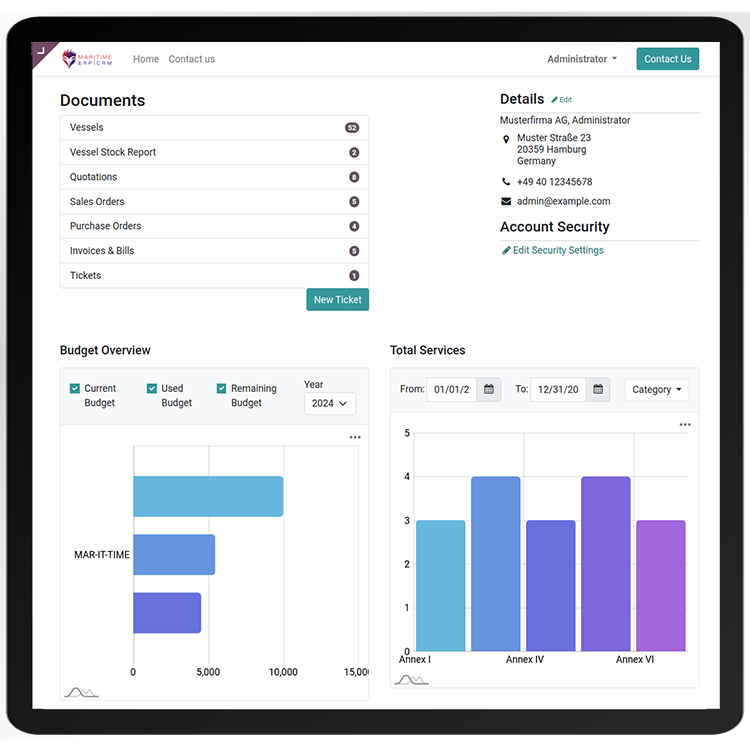
The customer portal is your service desk that works around the clock: customers log in and see their orders, quotations, invoices, documents and fleet data — exactly the slice that belongs to them.
Role-based access controls the view: a vessel's crew sees their ship, a fleet manager sees the whole fleet with KPIs, budgets and downloads. Requests become tickets, documents are self-service, and your phone rings less while customers feel better informed.
A fleet manager checks the portal Sunday evening: budgets per vessel, services of the quarter, the certificates of last week's jobs — downloaded without a single e-mail to your team.
Maritime
'Maritime' is the difference between software that tolerates shipping and software that is built for it. Vessels, IMO numbers, ports, tariffs, agencies, ETAs — in Maritime ERP these are native objects with real behavior.
This is what one click really means: the system already knows what a ship is, what a port call is, and how they price. Generic ERPs make you build that understanding from custom fields; here it is the foundation.
Ask a generic ERP consultant for 'orders per vessel with port tariffs' and you get a project plan. In Maritime ERP you get a filter.
Mobile App
The mobile app carries the system onto the water: orders, vessels, contacts and documents on phone and tablet, in a interface made for gloves-and-daylight conditions.
Crews confirm jobs, capture hours and photos, and check the day's schedule on the move. What is entered on the pier is in the office system the same second — one database, every device.
The launch master confirms the crew transfer from the boat, snaps the delivery photo, and taps 'done'. Dispatch sees the job complete before the launch is back at the pontoon.
API
The REST API opens every part of the system to other software: read vessels, create orders, fetch invoices — programmatically and permission-controlled.
Connect your existing tools, feed data warehouses, automate exchanges with big customers. The website's demo flow uses this same API — what you see on the map is the interface at work.
A major customer sends weekly job lists as structured data. A small integration posts them via the API as draft orders — Monday's typing marathon became a background job.
Multi-Language
The interface runs in each user's language, and documents go out in the customer's: a German crew, an English-speaking office and Greek customers can all work with the same system.
Product names, terms and templates translate once and apply everywhere — quotations in English, dunning letters in German, both from the same records.
The Hamburg office works in German; the quote to the Piraeus manager renders in English automatically — same order, right language on each side.
Time Zones
Shipping never sits in one time zone. Every user works in their local time while the system stores one consistent timeline underneath.
ETAs, deadlines and logs always mean the same moment for everyone — the classic 'was that their time or ours?' confusion disappears.
The agent in Singapore enters an ETA of 14:00 local. Hamburg dispatch sees 08:00 — both are right, and the pilot is ordered for the correct hour.
Backups
Your operation lives in this system, so the system is backed up twice: continuously, plus an independent copy every two hours.
The restore is tested — data safety is infrastructure you never have to think about.
A hardware fault takes a server down at 03:00. The three-server platform carries on; the incident is a log entry, your morning is completely ordinary.
Single Tenant
Single tenant means your company gets its own instance with its own database — your data shares hardware with nobody and a codebase with nobody's customizations.
Updates are scheduled with you, individual modules are possible without side effects on others, and data isolation simplifies every compliance conversation.
Your auditor asks where exactly the company data lives and who else can touch it. The answer is one sentence: on your own instance in a German data center — nobody else.
GDPR
GDPR compliance is built into the architecture: hosting in a German data center, single-tenant isolation, role-based access, logging and deletion concepts.
Processing agreements come as standard paperwork, and because the stack is European end to end, transatlantic data-transfer debates simply do not apply to your ERP.
A large customer sends their 40-question data-protection questionnaire before signing. Most answers are one line: German data center, own instance, EU jurisdiction — questionnaire returned the same week.
AIS
AIS is the transponder system by which ships continuously broadcast identity, position, course and speed. Maritime ERP can consume these feeds and show your world moving on the map.
Positions link to vessel records by MMSI and IMO number: see where a customer's ship actually is, estimate arrivals, and trigger workflows when a vessel approaches your port.
The globe on your dashboard shows the expected FRIESLAND TRADER 30 miles out, making 12 knots. The team preps her order two hours before the agent even calls.
Fleet KPIs
Fleet KPIs aggregate per-vessel data into the numbers a fleet operator steers by: services per period, volumes, costs, budget utilization — per ship and across the fleet.
In the portal, your customers see these dashboards for their own fleet: transparency that deepens the relationship and sets your service apart.
In the quarterly review you show the customer their fleet dashboard: volumes per vessel, trend against last year. The conversation shifts from prices to plans — and the contract renews itself.
Role-Based Access
Roles decide who sees and does what: dispatch works orders, accounting sees the money, customers see their portal slice — every group exactly what their job needs.
Rights follow records too: a portal user sees their vessels and nothing beyond. Access reviews are simple because permissions are structured, not sprinkled.
A new dispatcher starts on Monday. One role assignment and they have exactly the orders, vessels and calendars of their team — and no view of payroll.
E-Mail Integration
E-mail is where maritime business happens — and where information goes to disappear. The integration attaches incoming mail to the right customer, lead or order automatically, and sends outgoing documents from the system.
The whole thread lives on the record: whoever opens the order sees the correspondence, regardless of whose inbox it passed through.
The agent replies to a quote while your account manager is on leave. The mail is on the order anyway — the stand-in answers within the hour, context complete.
See the click for yourself — vessel to sales order in seconds.
30 minutes, your use case, no slides — 100% no obligation.
Request a Demo